
Only a handful of years ago, "scheduling" was the gold standard. You wrote a post, picked a time, and a tool like Buffer or Hootsuite pushed it live. But in 2026, that manual "Hamster Wheel" is exactly what’s killing your reach.
The game has changed from volume to velocity and authority. If you’re only posting your own content, you aren't an authority; you’re just a broadcaster. To build a true brand in today's landscape, you have to be a curator. You need to be the person who finds the best industry news, adds a layer of insight, and keeps your audience informed without spending four hours a day scrolling through feeds.
This is where ContentStudio.io thrives!
Most people mistake ContentStudio for a simple Buffer alternative. That is like calling a Swiss Army Knife a pocket knife. While the big boys like Sprout Social have pivoted toward massive enterprise social listening (with a price tag to match), and Buffer has remained a minimalist scheduler, ContentStudio has carved out a unique space as the AI-Driven Command Center for the people like us who want to make social media easier and not something we have to spend a lot of time on.
At The Home Business Challenge, I believe in being a practitioner, not just a theorist. That’s why I disclose that I am an affiliate for several tools mentioned in my guides. When you use my links, you’re helping support my work in finding the best "Survival" strategies for home businesses. I’m an Amazon Associate and an affiliate for brands I trust. I’ll always give you my honest take, regardless of the commission, because your trust is my most valuable asset.

The 2026 Shift: From Scheduler to Discovery Engine
In my 10 years of SEO and affiliate marketing, the biggest bottleneck I see is Content Fatigue. We spend so much energy building our owned assets—the blogs, the newsletters, the products—that our social distribution becomes an afterthought. We end up dumping links into a scheduler and wondering why the engagement is zero.
ContentStudio solves this by flipping the script. It doesn't ask, "What do you want to post?" It shows you what the world is already talking about. Through its native Discovery Engine, ContentStudio allows you to tap into trending industry news, viral videos, and niche-specific articles. It then uses Agentic AI to help you summarize that content, add your unique take, and distribute it across every platform from LinkedIn to TikTok in one workflow.
My thoughts: In 2026, you don't need another tool that just "sends" posts. You need an intelligence teammate that helps you find, refine, and recycle the content that actually moves the needle.

The Killer Features Deep Dive — Your Toolkit
In 2026, a social media tool is only as good as the time it saves you. ContentStudio doesn’t just sit there waiting for you to feed it; it actively hunts for content and manages the heavy lifting of distribution through what they call "Automation Recipes."
Here are the three pillars that move ContentStudio from a "nice-to-have" to a "must-have" for any of us wanting less social media!
1. The Discovery Engine: Curation on Autopilot
The biggest drain on a specialist's time is finding what to talk about. ContentStudio’s Discovery Engine is a built-in search engine for trending content.
How it works: You plug in your niche keywords (e.g., "Technical SEO," "Affiliate Marketing," or "SaaS Growth"). The tool scours the web, YouTube, and social feeds to show you what’s currently viral or gaining traction.
You Edge: You can filter by "Trending Score" or "Sentiment." This allows you to find a controversial industry article, hit "Share," and use the integrated AI to draft a counter-opinion in seconds. You aren't just a reporter; you’re the analyst.
2. Automation Recipes: The "Set and Forget" Framework
This is where ContentStudio leaves Buffer and HootSuite in the rearview mirror. Their Automation Recipes are pre-built workflows that handle your distribution logic.
The RSS-to-Social Loop: Every time you publish a new post on your blog, ContentStudio detects the RSS feed, uses AI to generate five different captions (one for LinkedIn, one for X, one for Facebook, etc.), and schedules them at the "Best Time" for each platform.
Evergreen Recycling: We all have those "Money Posts"—the high-converting affiliate reviews or lead magnets. ContentStudio allows you to mark these as Evergreen. It will automatically re-queue them into your feed every few weeks or months, ensuring your best assets never die in the archives.
3. The 2026 AI Suite: Beyond Simple Captions
By 2026, everyone has an "AI Assistant," but ContentStudio’s version is actually useful for specialists.
AI Visual Insights: Upload a screenshot of a new SEO tool or a graph. The AI analyzes the image and suggests a caption based on the data it sees in the picture.
Platform-Specific Variations: It understands that a "LinkedIn Thought Leader" post needs a different tone than a "Twitter Thread." One click transforms a long-form insight into a punchy, high-engagement thread.
The Workflow Sample
I spend 15 minutes on Monday morning inside the Discovery Engine. I find 5 trending articles, use the AI to add my take, and schedule them. My RSS recipe handles my new blog posts, and my Evergreen queue handles my affiliate links. Total manual work for the week? Under 20 minutes.
The 4-Way Battle — ContentStudio vs. The Titans
In 2026, choosing a social media tool is no longer about who has the best "calendar." Every platform has a calendar. The real battle is between Affordability, Automation, and Intelligence. To help you see where ContentStudio fits into your stack, I’ve broken down how it compares to the five other major players currently dominating the specialist landscape.
The Comparison Deep Dive
ContentStudio vs. Buffer: The Brain vs. The Buffer
Buffer is the minimalist’s dream. It’s perfect if you manually craft every post and just need a place to park them. However, Buffer lacks the Discovery Brain of ContentStudio. While Buffer waits for you to provide content, ContentStudio goes out and finds it for you. If you are a one-person show, ContentStudio’s automation saves you hours of manual research that Buffer simply can't do.
ContentStudio vs. Sprout Social: The ROI vs. The Enterprise
At $249/month, Sprout Social is a beast. It’s a Ferrari for corporate social teams who need deep listening and sentiment analysis. But for a specialist or an agency, ContentStudio’s $99 Agency Plan offers almost identical scheduling and analytics power for a fraction of the cost. You can manage 25 accounts and unlimited team members on ContentStudio for less than the cost of one user on Sprout.
ContentStudio vs. SocialPilot: The Automation vs. The Bulk
SocialPilot is a workhorse for agencies who need to bulk-upload 500 posts at once via CSV. It’s steady and reliable. However, ContentStudio’s Evergreen Recycling and RSS Automation are much more sophisticated. While SocialPilot handles the volume, ContentStudio handles the logic—automatically repurposing your best content so you don't have to keep re-uploading those CSVs.
My Verdict: If you’re a solopreneur on a budget, Publer or Buffer are great starting points. But the moment you have more than 5 social accounts or want to automate your blog’s distribution, ContentStudio is the most cost-effective Pro tool on the market. It gives you 90% of Sprout Social’s power at 20% of the price."
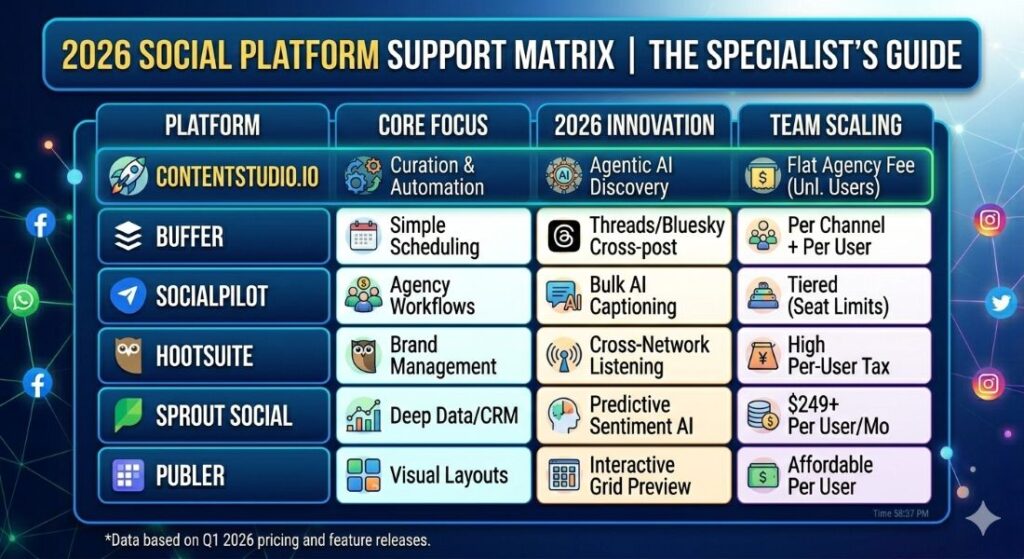
The Scaling Tax — The Truth About Growth in 2026
In 2026, the "Scaling Tax" in social media tools is often hidden behind per-user pricing. While a tool might look affordable at first glance, the moment you hire a Virtual Assistant or bring on a business partner, your monthly bill can double or triple.
As a specialist, you need to know where the Price Wall sits. Here is how ContentStudio’s 2026 math stacks up against the competition when you move from a solopreneur to a small team.
The 2026 "Social Scale" Comparison Table
This comparison shows the monthly "Software Overhead" required to manage 10, 25, and 50 client brands (assuming 5 social profiles per brand).
Prices reflect monthly billing for professional-grade plans as of early 2026.
| Client Volume | ContentStudio (Agency Plan) | SocialPilot (Agency+) | Sprout Social (Enterprise) |
| 10 Clients (50 Profiles) | $99/mo | ~$170/mo | ~$1,200/mo* |
| 25 Clients (125 Profiles) | $139/mo | ~$350/mo | ~$3,500/mo* |
| 50 Clients (250 Profiles) | Custom ($250+) | ~$600/mo | Inquiry Only |
| Team Members | Unlimited | Limit of 10 | Per Seat Fee ($249+) |
1. The Per-Seat Trap
Look closely at Sprout Social and Hootsuite. In 2026, they have almost entirely abandoned the solopreneur market. If you have a team of three people, Sprout Social will cost you nearly $750 per month. That isn't a software bill; that's a part-time salary.
ContentStudio, on the other hand, uses a Workspace Model. Their $139/month Agency plan (often $99 if billed annually) allows for unlimited users. This means you can bring on ten VAs to manage 25 different social accounts, and your price doesn't change by a single penny.
2. The Add-On Reality
While ContentStudio is the clear winner for teams, be aware of the "Usage Tax" on AI.
In 2026, ContentStudio plans come with generous AI word counts (25k to 125k words), but if you are using their AI to generate every single caption and blog summary, you may need to buy AI Add-on credits (typically $5 per 100 images or $0.75 per 1,000 words).
Specialist Tip: Always check your "AI Credit" dashboard. If you're a high-volume curator, the Agency plan is actually the cheapest option because of the higher base limits.
3. The Hidden Value of "Workspaces"
In ContentStudio, a Workspace is a silo. If you manage three different niche sites (e.g., an SEO blog, a fitness brand, and a local business), you can keep their Discovery feeds, social accounts, and team members completely separate. Most "budget" tools like Buffer lump everything into one messy bucket unless you pay for their highest-tier enterprise plans.
Why I Chose ContentStudio:
1. The "Zero-Tax" Team Model
If you hire a new account manager in 2026, Sprout Social adds another $250+ to your monthly bill. In ContentStudio, you simply send an invite. You can have a team of 30 people managing 30 clients for the same price as a solo operator. This is how you protect your profit margins.
2. Client-Specific Workspaces
You can't have your Fitness Client seeing the trending news alerts for your SaaS Client. ContentStudio allows you to create siloed workspaces. Each client gets their own:
- Discovery Feed: Tailored to their specific industry.
- Asset Library: No accidental posting of the wrong brand's logo.
- Approval Workflow: Clients can log in to a white-labeled dashboard to approve posts without seeing your "behind-the-scenes" automation recipes.
3. The "White-Label" Edge
On the Agency plan, you can remove ContentStudio’s branding. When you send a monthly analytics report or an approval link, it looks like it came from your agency’s proprietary tech stack. In 2026, perceived value is everything.
The Bottom Line: If you are an agency owner, the ContentStudio Agency Plan is essentially a fixed cost. While your revenue grows with every new client you sign, your software cost stays flat. That is the definition of a scalable business.
If you are a solo creator, Buffer or ContentStudio’s Starter Plan are neck-and-neck. But the moment you hire your first team member or manage more than 10 social accounts, ContentStudio’s flat-pricing model becomes a massive competitive advantage. It’s the only way to scale your distribution without scaling your overhead."
The Workflow — Your 20-Minute Monday Morning
The difference between a stressed-out "poster" and a relaxed entrepreneur is a repeatable workflow. You don't want to spend your week reacting to the feed; you want to command it.
Here is the exact 3-step workflow I use inside ContentStudio to handle a week's worth of high-authority distribution in about 20 minutes.
Step 1: The Discovery Blitz (10 Minutes)
Instead of scrolling Twitter or LinkedIn for inspiration, go straight to the Discovery Tab.
The Move: Filter by your Saved Searches (e.g., Technical SEO News or SaaS Trends).
Your Edge: Look for articles with a high "Trending Score" but low social shares. This is your chance to be the first to break a story to your audience.
The Action: Hit "Share," and let the AI Assistant summarize the key points into a punchy LinkedIn or Facebook post. Add your one-sentence take at the top to give it your unique brand voice.
2. The Evergreen Audit (5 Minutes)
A brand is built on pillars—your best-performing affiliate reviews, lead magnets, cornerstone guides, etc.
The Move: Navigate to Publisher > Automations > Evergreen.
The Action: Check your "Money Posts" queue. Ensure you have at least 10–15 high-value posts set to recycle.
Your Edge: Use the Auto-generate Variations tool. The AI will take your one blog link and create five different ways to talk about it, so your audience never sees the exact same post twice.
3. The Smart Queue Sync (5 Minutes)
Now that your manual and evergreen posts are ready, you need to make sure they actually land when people are looking.
The Move: Open the Visual Calendar.
The Action: Drag and drop any overlapping posts. ContentStudio’s Best Time to Post feature will highlight the optimal slots based on your specific audience's 2026 engagement data.
Your Edge: Ensure you have a Content Mix of 60% curated industry news, 30% your own content, and 10% direct calls-to-action (affiliate links/products).
My Thoughts: Automation is not about being lazy; it's about being consistent. By front-loading your 'Discovery' and 'Evergreen' tasks on Monday morning, you free up the rest of your week to actually engage with the comments and build real relationships.
No tool is perfect, and you need to know where the "paint is peeling" before you move your entire operation. In 2026, ContentStudio is a powerhouse, but it has specific trade-offs that might be deal-breakers depending on your workflow.
Here is the unfiltered look at what’s working and what’s frustrating in the current version.
The Pros: Why It’s in My Stack
The "Curation-to-Post" Speed: Nothing in 2026 touches their Discovery Engine. Being able to find a trending article, summarize it with AI, and schedule it across five platforms in under 60 seconds is a genuine competitive advantage.
Best-in-Class Automation: Their Automation Recipes (especially RSS-to-Social) are more logical and reliable than Buffer or SocialPilot. It’s set and forget in the truest sense.
Agency-Friendly Pricing: As we saw in the math section, the flat-rate workspace model is a godsend for anyone managing multiple brands or a small team. Not being taxed for every new hire is a huge win for a growing fortress.
The Cons: The Growing Pains
The Mobile App Gap: While the desktop version is a command center, the mobile app still feels like a secondary thought. It’s great for checking your calendar or approving a post on the go, but trying to build a complex "Automation Recipe" or use deep discovery tools on your phone is an exercise in frustration.
The Learning Curve: Because it does so much, the UI can feel cluttered. If you’re coming from the simplicity of Buffer, you’ll likely spend your first week saying, "Where did that button go?" It takes about 7–10 days to truly master the workflow.
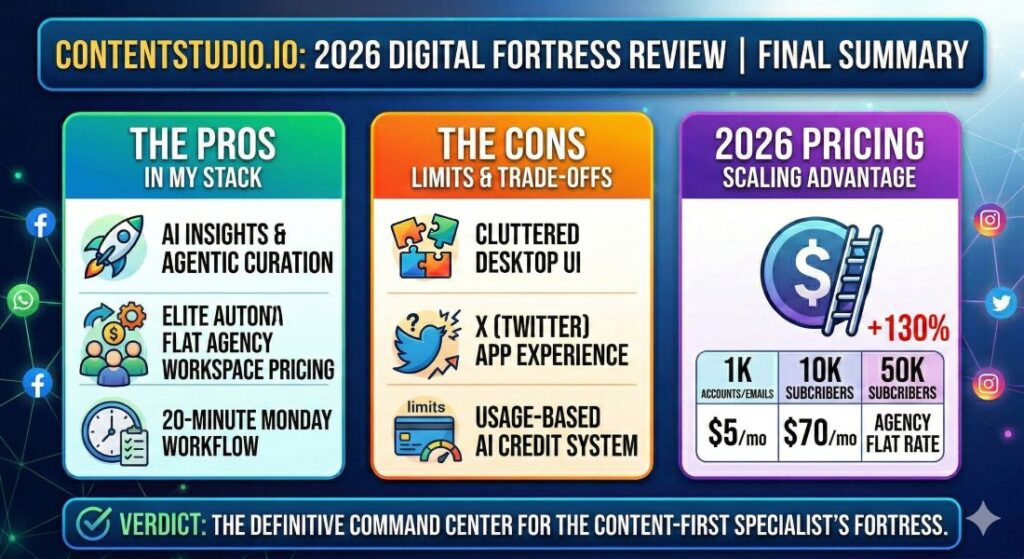
The API Dance: Like every tool in 2026, ContentStudio is at the mercy of platform API changes. While they’ve handled the shift to X better than most, you may still encounter occasional "reconnection" prompts or character-count glitches that require a manual fix.
The Final Verdict — Is ContentStudio Your Command Center?
After breaking down the Discovery Engine, the "Scaling Tax," and the 2026 AI workflows, we’ve reached the bottom line. ContentStudio isn't trying to be the "everything tool" for everyone—it is laser-focused on the Content-First Specialist.
The Decision Matrix
Build Your Fortress with ContentStudio if: You manage a high-volume content strategy (blogging, YouTube, or Newsletter) and need a tool that handles the distribution and curation automatically. If you want to scale your presence without scaling your work hours, this is your ROI winner.
Look Elsewhere (Buffer/Publer) if: You only post 1–2 times a week to a single platform and don't need "Discovery" or "Automation Recipes." At that level, the extra features are just noise.
Look Elsewhere (Sprout Social) if: You are a Fortune 500 brand that needs deep "Social Listening" (tracking brand sentiment in real-time) and you have a $3,000+ annual budget for social software alone.
In 2026, manual posting is a leaky bucket. If you are manually crafting every post, you are losing hours that should be spent on strategy or client work.
The internet doesn't need more "posters." It needs more authorities. ContentStudio.io is the bridge that moves you from being a person who shares to being a specialist who curates the conversation.
Ready to stop the manual grind? 👉 Try ContentStudio for yourself!
Bonus: Day 1 Checklist: Your First 60 Minutes in ContentStudio
Don’t get overwhelmed by the dashboard. If you want to build your brand without the burnout, follow this sequence to set up your foundation.
Phase 1: The Infrastructure (15 Minutes)
- [ ] Connect Your Core 4: Link your LinkedIn, X (Twitter), Facebook, and Instagram/TikTok accounts.
- [ ] Set Your Timezone: Ensure your workspace is synced to your primary audience’s location, not just your own.
- [ ] Define Your Categories: Create 3–5 "Content Categories" (e.g., Technical SEO, Affiliate Tips, Personal Brand). This makes your reporting and filtering much cleaner later.
Phase 2: The Discovery Engine (20 Minutes)
- [ ] Build Your Saved Searches: Input your niche keywords into the Discovery Hub. Filter for articles with a "Trending Score" of 70+.
- [ ] Identify 5 Sources: Find 5 high-authority blogs or YouTube channels in your niche and add them to your RSS Feed list.
- [ ] Curate Your First 3 Posts: Find three trending articles, use the AI Assistant to draft a "Specialist's Take," and schedule them for the next 48 hours.
Phase 3: The Automation Foundation (25 Minutes)
- [ ] Activate your RSS Recipe: Create an automation that monitors your own blog’s RSS feed and automatically queues new posts with AI-generated captions.
- [ ] Seeding the Evergreen Queue: Take your top 5 "Money Posts" (highest-converting affiliate reviews or lead magnets) and add them to the Evergreen Recycling folder.
- [ ] Set the "Best Time" Guardrails: Go to Settings and enable the AI Best Time to Post recommendations for each channel.
By the end of this hour, you shouldn't just have posts scheduled. You should have a system that is actively hunting for news and automatically protecting your best content. You’ve just bought yourself back at least 5 hours of work next week.
 No more wasting time learning – let’s start doing! My name is Becca and I’m your new digital BFF! 🙂 Let’s crush our side hustles together & turn them into full-time incomes!

0 Comments