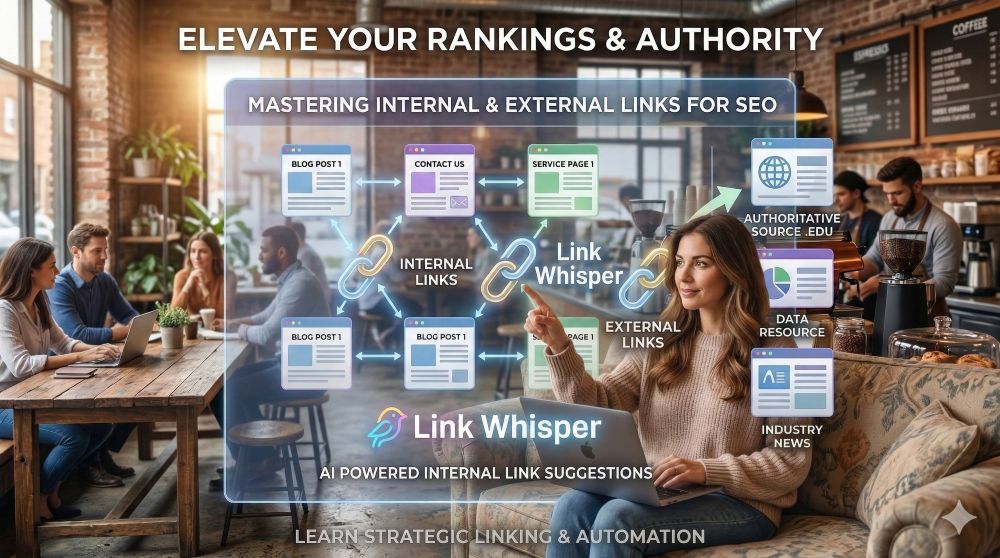
So you’ve built your website, written an engaging article, and drawn users in with stellar meta titles—you’re really nailing this whole SEO thing. But if you aren't strategically connecting your pages, you're leaving rankings on the table.
Utilizing internal and external links is a technique that will soon become your best friend. It might seem counterintuitive to lead users away from your page, but by providing a "world of information," you establish authority and keep users in your ecosystem longer.
And just in case you aren't certain of the difference, internal links are when you provide a hyperlink within the text of your articles that takes a user to another page or article on your website. External links take them to other websites. Your approach to internal and external linking should be different, so we’re going to cover the benefits and strategies for each one separately.

At The Home Business Challenge, I believe in being a practitioner, not just a theorist. That’s why I disclose that I am an affiliate for several tools mentioned in my guides. When you use my links, you’re helping support my work in finding the best "Survival" strategies for home businesses. I’m an Amazon Associate and an affiliate for brands I trust. I’ll always give you my honest take, regardless of the commission, because your trust is my most valuable asset.
Internal Links: Building Your Web
Internal links take a user to another page on your website. They are the connective tissue that helps Google understand the hierarchy of your site.
The Benefits:
Increased Dwell Time: The longer a user stays on your site, the better your SEO. Dwell time (how long a user stays on your website) is a metric that Google looks at when ranking a website. So when you add helpful internal links, the user is more likely to stick around and see more of your site.
Improved Crawlability: Search engines use these links to find and index your new content. Google can't really find a page on your site very well or easily if you aren't linking to it. Search engine bots "crawl" a website and they do so by following your internal links. This helps Google understand your site better but it also helps your new content rank quicker if you link to it from other pages across your site.
Becca's Tip: Don't throw links any and everywhere. Be mindful and strategic about where you place the links. Make sure it's relevant and helpful to your readers and within the context of your page.
Keyword Context: The words you turn into a link (anchor text) tell Google exactly what the target page is about. If you're turning the words "click here" into a link to another page on your website, it doesn't help Google understand the context of what the page is about in relation to the link. These little details might seem a bit much, but they are all ways Google reads and understands your website. Making it easier for Google makes it easier for them to rank you better!
Knowing the benefits is one thing, but like any aspect of SEO, there are a few rules you need to follow to ensure you make the most of what internal links have to offer your rankings.
How to Make Them Work:
Create a Content Library: The more you write, the more opportunities you have to link, and the longer your users will stay engaged on your site. Of course, you want to make the content relevant, helpful, and of high quality. All these factors send a lot of great signals to Google that you're knowledgeable, credible, and an authority on the subject you're writing about.
Need to organize your content better? Make sure to learn how to create and implement a topical map for your content! (Oh look! That was a relevant internal link) 🙂
Keep it Natural: Don't force a link. It should anticipate a reader's curiosity. Like the topical map internal link right above here, make sure the context and content is relevant. If it doesn't feel natural but you know you want to link to a certain page, expand on the topic with a new paragraph or section to make it a more natural fit.
If it feels unnatural to the user or the end up on a page they weren't expecting, that can leave a negative feeling for the user and they're much more likely to leave and not return. We don't want that.
Don’t Go Overboard: Aim for 2–4 internal links per standard article to keep the UI clean. There's no particular number that you should shoot for or avoid. It largely depends on the length of your text and what makes sense to you. And if you're not sure, simply stick to 2 - 4 internal links per article or page.

Pro Tip: Use Link Whisper to Save Hours Manually searching your old posts for linking opportunities is exhausting. This is where the Link Whisper plugin becomes invaluable. It uses AI to suggest relevant internal links as you write in WordPress. It also features a "Link Report" that shows you which of your posts are "orphaned" (have no internal links), allowing you to fix your site structure with a single click.
External Links: Building Your Authority
External links take users to other websites. While it feels like sending traffic to other websites or even competition seems kind of crazy, it actually signals to Google that you are a well-researched, trustworthy resource. These are more signals that help Google understand your content and see you as more of an authority because you're linking to other authoritative content and websites.
The Benefits:
Credibility: Linking to high-authority sources like expert sources about your topic, edu or .gov sites, boosts your own perceived trust.
Topic Correlation: It helps Google decipher your niche by seeing who you associate with and relate to.
How to Make Them Work:
Prioritize Trust: Only link to reputable, high-quality content. Linking to "spammy" sites can actually hurt your rankings.
Be Specific: Link to a deep-dive article or a specific data point, rather than just a company’s homepage.
Relevancy is King: Ensure the external content aligns perfectly with your topic. It should feel like a natural, further reading suggestion.
Should I Open Links in a New Window or New Tab?
Internal links? No. Don't do that.
External links? This one is tough for me. The prevailing opinion is that external links should open in a new window. I used to do this for all external links. The thought is that you want to still have your site open when a user leaves to go to another site.
But over the last couple of years, I've changed my opinion about external links opening in a new window. Why? I feel like it's a user experience issue.
Do you like it when a new tab or window opens on your phone unexpectedly? I really don't like it. Am I alone here? Haha.
I've changed my strategy here completely. People know how to use the back button in their browser these days. If they want to return to your website, they will. I don't feel like most people probably don't appreciate a new tab opening without their knowing.
If you're really insistent on external links opening in new tabs or windows, please for everyone's sake, find a way to add a little new tab icon to signal that the link will open in a new window.
That's just my two cents. 🙂
Conclusion
When you master the art of internal and external linking, your traffic increases, your bounce rate drops, and your site stands out to search engines. It’s a simple process that, when paired with tools like Link Whisper, becomes a seamless part of your workflow.
Take these tips, audit your current posts, and start building a better-connected website today!
 No more wasting time learning – let’s start doing! My name is Becca and I’m your new digital BFF! 🙂 Let’s crush our side hustles together & turn them into full-time incomes!


0 Comments