Let’s be real for a second: Reporting tools are complicated! Usually, they have so many tools and charts that it’s easy to feel like you’re trying to pilot a space shuttle when you just wanted to see if your blog post is ranking yet!
If you’re like me, you don’t have all day to click through twenty different reports. You need a "Command Center"—one single screen that tells you if your home business is winning or if you need to pivot.
That's one of the biggest reasons I use Semrush. Semrush is a total beast. 🐉 And it's my absolute go-to tool for SEO dashboards, insights, and reports that I need for myself or clients.
Today, I’m showing you exactly how to set up a Semrush SEO Dashboard that cuts through the noise and gives you the real truth about your data.
And if you want, there's currently a free trial at Semrush if you want to plug your site in and follow along!

At The Home Business Challenge, I believe in being a practitioner, not just a theorist. That’s why I disclose that I am an affiliate for several tools mentioned in my guides. When you use my links, you’re helping support my work in finding the best "Survival" strategies for home businesses. I’m an Amazon Associate and an affiliate for brands I trust. I’ll always give you my honest take, regardless of the commission, because your trust is my most valuable asset.
🛠 Step 1: Start Your "Project" (The Foundation)
You can’t have a dashboard without a Project. In Semrush, go to the SEO Dashboard section and click "Create Project."
Think of your Project as your website’s "medical file." It’s where Semrush keeps track of everything specific to you. This will start the basics of your Dashboard and will make your life so much easier!
Check this out!

📈 Step 2: The Big Three Widgets You Need
Once your project is live, Semrush will give you a default dashboard. But to make it truly useful for a you and your business, you want to focus on these three sections:
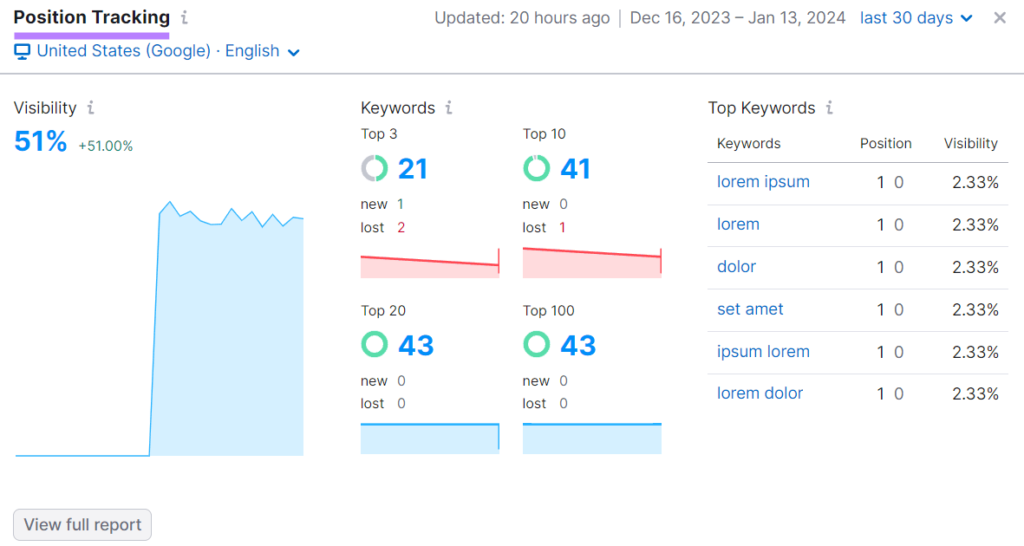
1. Position Tracking (The Scoreboard)
This is where you track your "target keywords"—the ones you really want to rank for.
- Why it matters: It tells you your Visibility %. If this number is going up, you’re becoming a bigger deal in your niche!
- Becca’s Tip: Don't track 5,000 keywords. Pick your top 20 "money" keywords so you don't get overwhelmed.
2. Site Audit (The "Health Check")
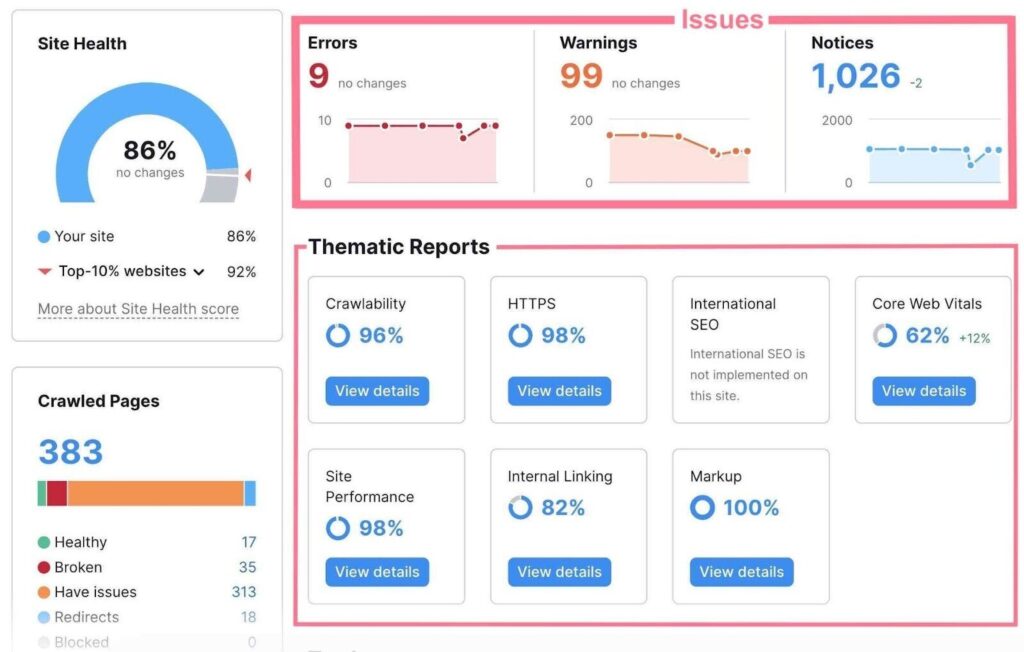
This widget gives you a Site Health Score.
- The Goal: You want to stay above 80%. If you see a sudden drop, it usually means you have broken links or crawl errors that are hiding your site from Google.
- Becca’s Tip: Don't panic over Notices. Focus on the Red Errors first. Those are the ones that actually hurt your rankings.
3. Organic Traffic Insights (The "Reality Check")
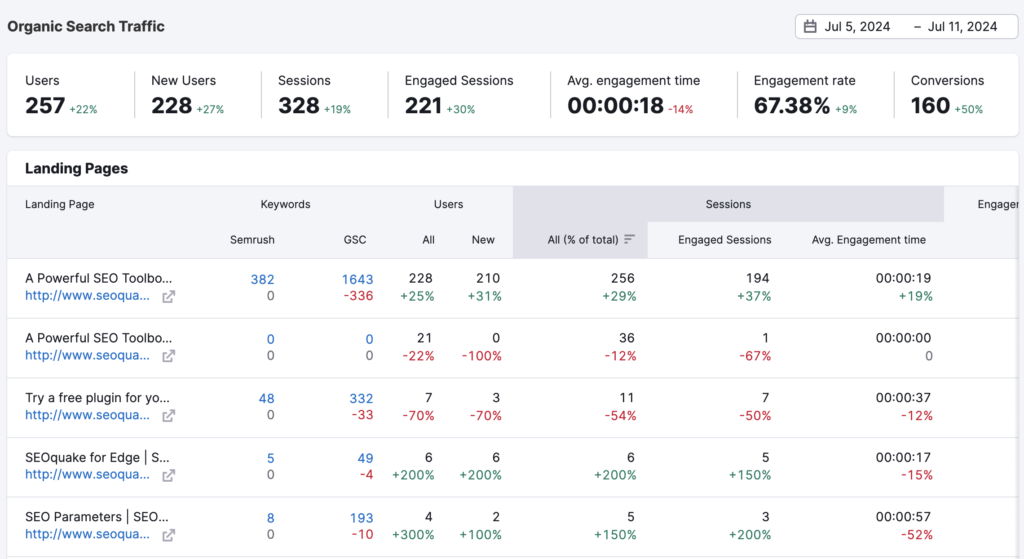
Connect your Google Search Console and Google Analytics here.
- Why it matters: Semrush data is an estimate, but GSC data is the truth. Seeing them side-by-side helps you see if your ranking improvements are actually turning into real clicks.
🎨 Step 3: Use "My Reports" for the Professional Polish
If you’re managing clients (or just want to feel like a CEO), you need to use the My Reports tool. I love this tool so much and almost makes Semrush pay for itself.
You can get the dashboards sent right to your email in a nice report. If you have clients, you can have these sent directly to the client and even branded to you so you look like an absolute hero!
Clients always, always, always want to see reports and data. Semrush makes it SO easy and breezy.
The "Set it and Forget it" Hack: You can build a custom PDF report using their "SEO Summary" template.
The Magic Part: Schedule it to email you every Monday morning. You can check your progress while you drink your coffee, without even logging into Semrush! ☕️
🚩 Becca’s Dashboard "Red Flags"
Ignoring Competitors: Semrush has a "Main Competitors" widget. Use it! If they are gaining visibility and you aren't, it’s time to see what content they’re writing that you aren't.
Vanity Metrics: Don't get obsessed with "Authority Score." It’s a cool number, but Organic Clicks and Leads are what pay the bills. 💸
Missing the "Mobile" View: Most people search on phones. Make sure your Position Tracking is set to "Mobile" so you see what your customers are seeing!
🎯 The Final Challenge:
I want you to go into Semrush right now, start a free trial, and do three things:
- Connect your GSC/GA to your project dashboard.
- Add 10 keywords to your Position Tracking.
- Schedule one automated report to email you next Monday.
Stop staring at the Matrix of data and start using your Command Center to grow! 🚀✨
🏁 Now That You’re Tracking, It’s Time to Grow!
Seeing your data in a dashboard is only half the battle. Here is how you actually improve those "Red Errors" and "Visibility %" scores:
- My Honest Semrush Review: A deep dive into all the other features of my favorite SEO tool (beyond just the dashboards).
- Boost Your Site Speed: If your Site Audit score is low, your site speed is likely the culprit. Here is my checklist to fix it.
- Mastering the SERPs: Use this 7-step checklist to ensure every new post you track in your dashboard is set up for success.
SEO Dashboard FAQ: Your Questions Answered
An SEO dashboard is a centralized reporting tool that aggregates data from multiple sources like Google Search Console, Google Analytics, and Semrush into a single view. For home business owners, it’s essential because it saves time by showing your most important "money" metrics—like keyword rankings and organic traffic—without requiring you to log into five different platforms every morning.
The best way to track SEO performance for a new site is by monitoring three key areas: 1) Indexability (ensuring Google can actually see your pages), 2) Keyword Visibility (tracking if your site is starting to appear in the top 100 results), and 3) Organic Clicks. Using a tool like Semrush, you can set up a "Project" that sends you a weekly report on these specific growth indicators automatically.
To avoid "data overwhelm," your SEO dashboard should focus on these high-impact metrics:
Organic Visibility: The percentage of clicks you get for your target keywords.
Site Health Score: A technical check for broken links or crawl errors.
Keyword Position Changes: Seeing which blog posts are moving up (or down) the SERPs.
Conversion Rate from Organic Traffic: Tracking which keywords are actually leading to sales or sign-ups.
Yes, you can build a free SEO dashboard using Google Looker Studio (formerly Data Studio). By connecting your Google Search Console and Google Analytics 4 (GA4) properties, you can create a custom visual report. While free, it lacks the competitive intelligence and automated site auditing features found in a pro tool like Semrush.
While it’s tempting to check every day, SEO is a long game. For most home businesses, a weekly check-in is the sweet spot. Checking weekly allows you to spot trends and technical errors early without getting distracted by the daily "fluctuations" of Google’s algorithm.
Absolutely. One of the biggest advantages of a professional SEO dashboard is competitive benchmarking. You can add your top 3–5 competitors to your dashboard to see if they are gaining traffic on keywords you currently rank for, allowing you to pivot your content strategy before you lose your top spot.